
A Freelancer's Month-End Receipt Closeout: Camera Roll to Accountant-Ready in 30 Minutes
Most freelancers have the receipts. What they are missing is the monthly routine that turns them into records. A step-by-step closeout ritual that drains every source once a month so tax season is a filing exercise, not a search.
It is the last day of the month. Your camera roll has 34 receipt photos mixed in with everything else. There are three forwarded PayPal confirmations somewhere in email, a glovebox stub from a client lunch, and two Uber trips that are still just charges on a card statement. None of it is logged.
This is not an unusual situation. It is the default state for most freelancers, because receipts do not accumulate slowly and neatly. They arrive in bursts and scatter across every channel at once.
The problem is not the app. It is the missing ritual. A month-end receipt closeout is a 30-minute routine you run once a month to drain every source into one categorized, exportable record. Run it in October and November is a fresh start. Run it every month and tax season becomes a filing exercise, not a forensics project.
Why a monthly ritual beats a tax-season sprint
The IRS expects self-employed individuals to keep timely records of all business income and expenses. [1] "Timely" is doing real work in that sentence. It means records made close to the transaction, not reconstructed from memory six months later. A receipt from August that you log in February is a record of sorts, but it carries less weight than a record made the same week.
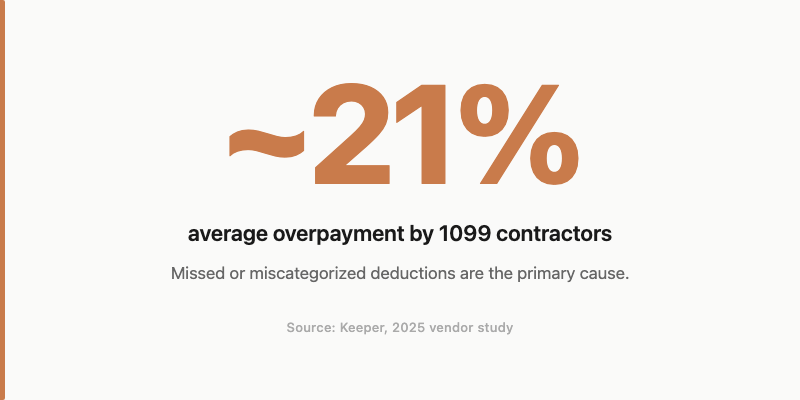
A Keeper analysis of 205 gig-worker tax returns, reviewed by an IRS Enrolled Agent, found the average 1099 contractor overpays taxes by approximately 21 percent, largely from missed or miscategorized deductions. [5] (This is a vendor study, not a government figure. It is included here for directional context, not as a precise benchmark.)
There is also a practical decay problem. Thermal paper fades within months. The receipt for that office chair purchase will be blank by the time you go looking for it in April. Memory of business purpose fades faster. The client lunch you cannot remember attending in September is the one your accountant cannot categorize in March.
And the backlog compounds. One skipped month means two months of receipts next time. Two skipped months means the categorization requires active reconstruction rather than quick confirmation. Each skipped month also means contemporaneous notes never get written for expenses that genuinely needed them.
A monthly closeout works precisely because it runs while the context is still there.
Step 1. Pull receipts from every hiding place
The IRS defines supporting documents as receipts, invoices, paid bills, and sales slips. [2] The practical challenge is that these documents do not arrive in one place. They scatter across four distinct sources, and a sweep that misses any of them leaves gaps in the record.
Camera roll. Search for any photo that is or contains a receipt. If you have been scanning at point of purchase throughout the month, this pile is small. If you have not, this is the longest step in the closeout. Either way, work through it systematically: photos app search for "receipt" may surface some; manual scroll catches the rest.
Email inbox. Search for PayPal, Stripe, Square, and subscription confirmation emails. The subject line search "receipt OR invoice OR payment confirmation" catches most of them. Do not forget forwarded receipts from vendors who emailed instead of printing.
Rideshare apps. Uber and Lyft send per-trip email receipts, but monthly invoice PDFs live inside each app. The maker of Ride Receipts, a desktop tool built specifically for bulk-downloading Uber invoices, noted in their Product Hunt listing that "in Uber's dashboard there is no easy way to get all invoices in one click." [7] Pull these manually or download the monthly PDF from within the app before moving on.
Paper. Jacket pockets, glovebox, desk drawer, wallet. Scan each one and confirm the extracted fields are readable before discarding the physical copy. For any receipt over $250, it is worth keeping the original until you have confirmed the scan is clean and backed up.
The shared pain behind this step is the same one that prompted TaxHacker to build a self-hosted AI accounting tool from scratch: "I got tired of manually typing receipts into spreadsheets." [6] The backlog is not unusual. Every source adds a little, and skipped months make all four sources worse at once.
In ReceiptNote, the on-device scan extracts vendor, amount, date, category, and line items directly from the receipt photo. It runs offline, so you can work through a stack of paper receipts without a connection. If OCR reads a faded thermal receipt with low confidence, the app flags it for manual review rather than silently saving incomplete data.
Good receipt scanning habits keep this step short. If you scan at point of purchase throughout the month, the closeout sweep is confirmation, not discovery. Once the pile is complete, Step 2 turns it into something categorized.
Step 2. Categorize while the context is fresh
Every sole proprietor and self-employed filer reports business expenses on Schedule C Part II. [4] The line items are specific: advertising, car and truck, commissions and fees, meals, office expenses, supplies, travel, and others. A wrong bucket does not eliminate the expense, but it may land on the wrong line of the return or attract a question the deduction cannot survive.
A few common mappings for freelancers:
| Expense | Schedule C Category | Deductible |
|---|---|---|
| Client lunch | Meals and entertainment | 50% |
| Domain renewal | Advertising | 100% |
| Co-working day pass | Office expenses | 100% |
| Design software subscription | Supplies or other expenses | 100% |
| Flight to client site | Travel | 100% |
| Home office (dedicated space) | Home office (Form 8829) | Proportional |
| Uber to client meeting | Car and truck or travel | 100% |
| Health insurance premiums | Self-employed health insurance deduction | 100% (Schedule 1) |
The categorization argument for doing this now, not at year-end, is straightforward: you know what the Uber trip was for today. In April, you will not. AI-assisted categorization at capture speeds up this step without removing the decision from the person best positioned to make it. ReceiptNote assigns a category at scan time and lets you correct it immediately. The assignment is a starting point, not a tax determination. Confirm it, adjust it if needed, and move on.
For a precise accounting of what each saved record must prove under IRS rules, the companion post covers the five-element standard: amount, date, place, business purpose, and business relationship. The category step is where you make sure the record maps to the right line. The quality pass is where you verify it holds up.
Step 3. Run the 10-minute quality pass
Scanning clears the pile. Categorization sorts it. The quality pass is what turns a scan pile into something an auditor can read.
The IRS standard for supporting documents requires proof of the elements of each expense: amount, date, place, and business purpose. [2] Business purpose is the field most commonly missing from freelancer records. "Lunch" is not a business purpose. "Lunch with Priya Mehta to review Q3 project scope" is.
Work through these four checks:
- Flags resolved. ReceiptNote surfaces low-confidence reads for manual review. Confirm or correct each flagged field before closing the month. A vendor name misread as a different vendor, or an amount transposed, is the kind of error that costs more time to find in an audit than it would have taken to fix in the app.
- Business purpose added. Any ambiguous expense (a meal, a flight, a mixed-use purchase) gets a note. The note takes ten seconds to add. It can save hours of explanation later.
- Categories spot-checked. Scan 5 to 10 entries across different categories for obvious errors. The AI is accurate; it is not infallible, and the edge cases tend to cluster in specific expense types (mixed-use software, meals with unclear attendees, co-working in cities you rarely visit).
- Cash transactions logged. Manual entries for any cash expense that did not produce a scannable receipt. The IRS waives the receipt requirement for some small incidental expenses, but a manual entry with a note is still a better record than nothing.
The contemporaneous note matters beyond any single deduction. Records made at the time of the expense carry more weight with the IRS than explanations added retroactively. A note written the same day the lunch happened is contemporaneous. A note written during the quality pass one week later is close enough. A note written at tax prep nine months later is reconstruction.
This step is where the month-end closeout earns its name. You are not just filing; you are closing. Each receipt that passes this check is ready to archive.
Step 4. Export, archive, and review the month
The IRS sets out the retention periods clearly. [3] Most self-employed filers need to hold records for three years from the filing date. The window extends to six years if income was underreported by more than 25 percent, and to seven years for bad-debt or worthless-securities claims. Most solo contractors are planning for a three-to-six-year window, which means records need to survive well past the phone they were scanned on.
ReceiptNote's cloud sync and cross-device archive means the records persist beyond any single device or tax season. Scan on your phone, review on your laptop, access from anywhere. The archive is not stored locally: a new phone or a wiped device does not mean a lost year of receipts.
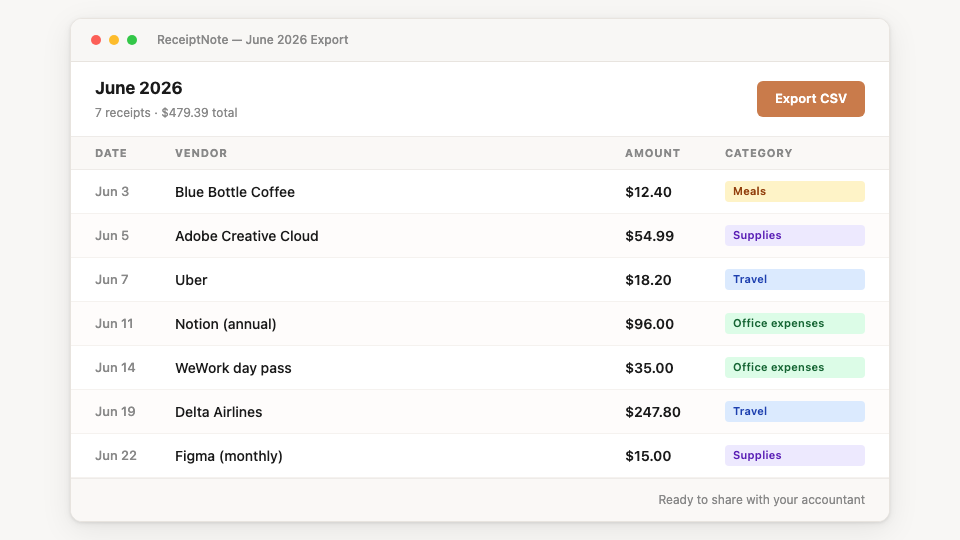
Export serves two purposes. The CSV file (columns: Date, Vendor, Amount, Category, Description) imports into QuickBooks Online and Xero through their standard import screens. The PDF version is a shareable summary for an accountant who prefers a formatted file. To be precise: you export the file, then import it through your accounting tool's standard import screen. The re-entry is eliminated. No live connection is made for you automatically.
One honest disclosure: ReceiptNote's free tier has a receipt limit. The Pro plan unlocks full storage, export, and category insights. If you are capturing a full year of active freelance expenses across multiple clients, plan for Pro before you discover the limit mid-year during a busy month.
After the export, spend five minutes with the month's analytics summary. Category totals surface the patterns: which categories are running high, whether any subscription renewals landed without a corresponding value, what the baseline looks like for the next quarterly estimated tax payment. The closeout does not end with an export file. It ends with a clear picture of what the month actually cost.
The four-stage paper trail framework for self-employed contractors covers what a complete record system requires at each stage: capture, Schedule C categorization, archive, and export. The monthly closeout is how you run that framework on a schedule that keeps it manageable rather than letting it grow into a tax-season project.
Ready to run your first closeout? ReceiptNote is free to start, no card required.
The one thing that turns a closeout into another backlog
The failure mode is not complexity. It is skipping one month.
A receipt backlog does not grow linearly. Skip October, and November starts with two months of receipts, fading thermal paper, and expenses you cannot explain with confidence anymore. The Uber trips blend together. The client lunches lose their attendees. The subscriptions that lapsed become harder to match to the month they actually ran. Skip two months in a row and the categorization step requires active reconstruction rather than quick confirmation: you are filling in context that was never captured, not reviewing context that was.
The fix is scheduling. Pick a recurring date: the last Friday of the month, the first Monday of the new month, whatever fits the rhythm of how you work. Protect 30 minutes on the calendar. Treat it the way you would treat a client deadline. The ritual takes longer when the pile is large, so the recurring date is also the incentive to keep the pile small. A month with 12 clean receipts takes ten minutes to close. A month with 80 receipts takes the full 30.
The habit is the system. The app makes the habit fast enough to keep.
Run the closeout, close the month
A month-end receipt closeout does not take long because the receipts are few. It takes long when you skip it.
Four steps: pull everything from every source, categorize while the context is fresh, run a quick quality pass, export and archive. Thirty minutes, once a month. The result is a categorized, exportable record your accountant can read without questions and the IRS can verify without reconstruction. The camera roll is clear. The glovebox stub is filed. The Uber trips are in the right column.
Run your first month-end closeout in ReceiptNote, free to start, no card required.
References
- IRS: Recordkeeping (Small Businesses and Self-Employed) https://www.irs.gov/businesses/small-businesses-self-employed/recordkeeping
- IRS: What kind of records should I keep? https://www.irs.gov/businesses/small-businesses-self-employed/what-kind-of-records-should-i-keep
- IRS: How long should I keep records? https://www.irs.gov/businesses/small-businesses-self-employed/how-long-should-i-keep-records
- IRS: About Schedule C (Form 1040), Profit or Loss From Business https://www.irs.gov/forms-pubs/about-schedule-c-form-1040
- Keeper: Gig Workers Overpay on Taxes by 21 Percent (analysis of 205 gig-worker returns, reviewed by an IRS Enrolled Agent; vendor study, not a government figure) https://www.keepertax.com/research/gig-workers-overpay-on-taxes-by-21-percent
- TaxHacker (vas3k): Self-hosted AI accounting tool; README origin story: "I got tired of manually typing receipts into spreadsheets" (signal evidence, not a survey) https://github.com/vas3k/TaxHacker
- Ride Receipts ("Uber Run") on Product Hunt: maker note "in Uber's dashboard there is no easy way to get all invoices in one click" (signal evidence, product listing) https://www.producthunt.com/products/ride-receipts-the-best-app-for-downloading-your-uber-lyft-receipts