
Making Tax Digital Receipts: A Four-Part Map for Sole Traders
Making Tax Digital separates the transaction record, retained evidence, quarterly update and annual return. Here is what UK sole traders record, keep and send.
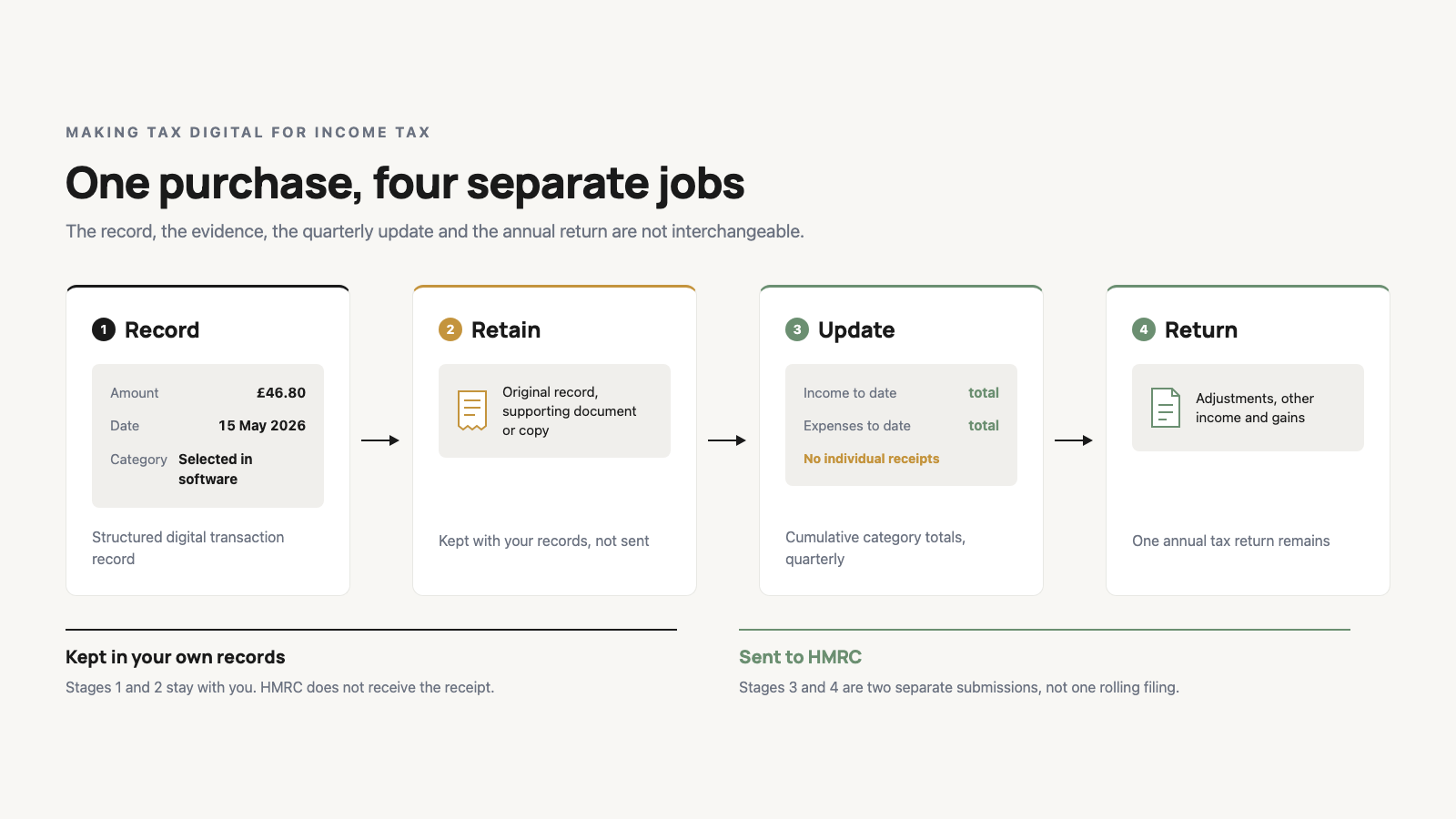
Making Tax Digital separates the transaction record, retained evidence, quarterly summary and annual return.
For UK sole traders, the phrase “Making Tax Digital receipts” hides four separate jobs. Under Making Tax Digital for Income Tax, an in-scope sole trader must create and store digital income and expense records in compatible software. For each relevant transaction, HMRC's current guidance names the amount, date and category. [2] You must also keep the original records, supporting documents or copies used to prepare the tax return. [2] Quarterly updates contain cumulative category totals, not individual receipt or invoice details. [3] One annual tax return remains. [1]
That is the useful answer to "Do my receipts have to be digital?" There is no single MTD receipt object. The record, evidence, quarterly summary and annual return connect, but they are not interchangeable.
| Job | Artifact | What it contains | Where it goes | Current HMRC source |
|---|---|---|---|---|
| Record | Structured digital transaction record | Amount, date and category | Kept in compatible software | [2] |
| Retain | Original record, supporting document or copy | Evidence used to prepare the return, such as an invoice or bank statement | Kept with your records | [2] |
| Update | Cumulative category totals | Income and expense summaries from the start of the tax year | Sent to HMRC quarterly | [3] |
| Return | Annual tax return | Checked records, adjustments, other income and gains | Sent to HMRC by 31 January after the tax year | [4] |
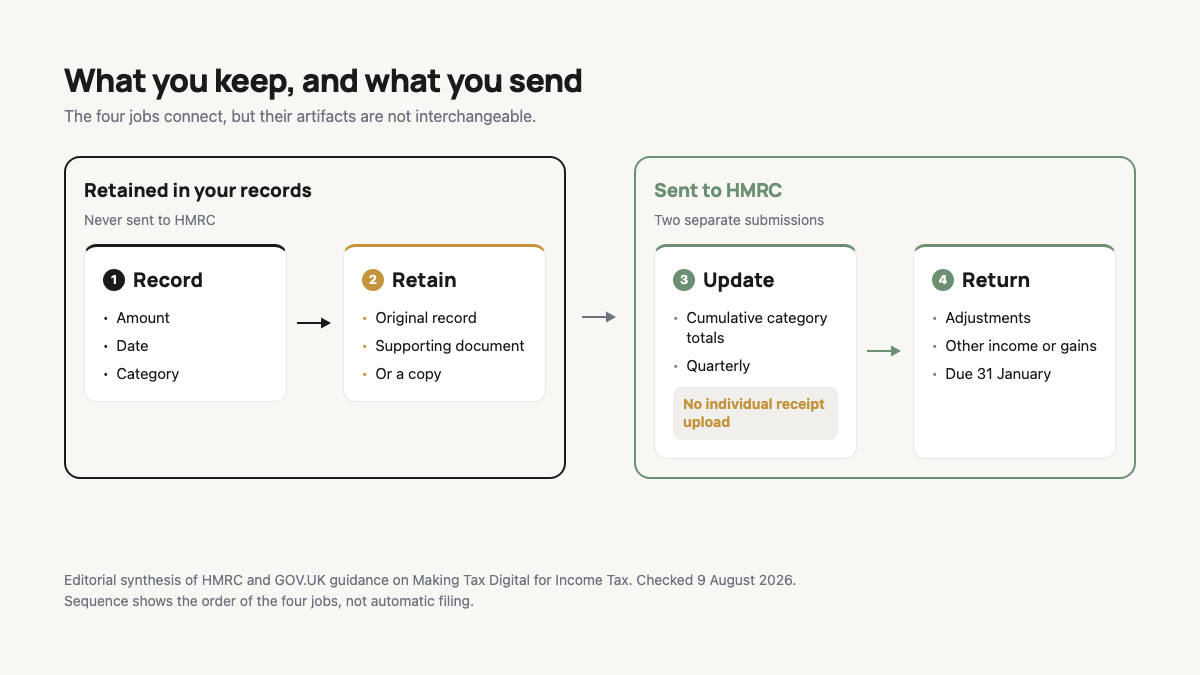
This four-part obligation map is my plain-language way of organising the current rules. It is not HMRC terminology. Before using it on a purchase, check whether the staged timetable applies to you.
Check when Making Tax Digital applies to you
The threshold is based on qualifying income, meaning total turnover from self-employment and property income before expenses. HMRC looks at the figure reported on the relevant earlier tax return. [1]
The staged timetable in guidance checked on 9 August 2026 is precise:
| Qualifying income shown on | Threshold | MTD start date |
|---|---|---|
| 2024 to 2025 tax return | Over £50,000 | 6 April 2026 |
| 2025 to 2026 tax return | Over £30,000 | 6 April 2027 |
| 2026 to 2027 tax return | Over £20,000 | 6 April 2028 |
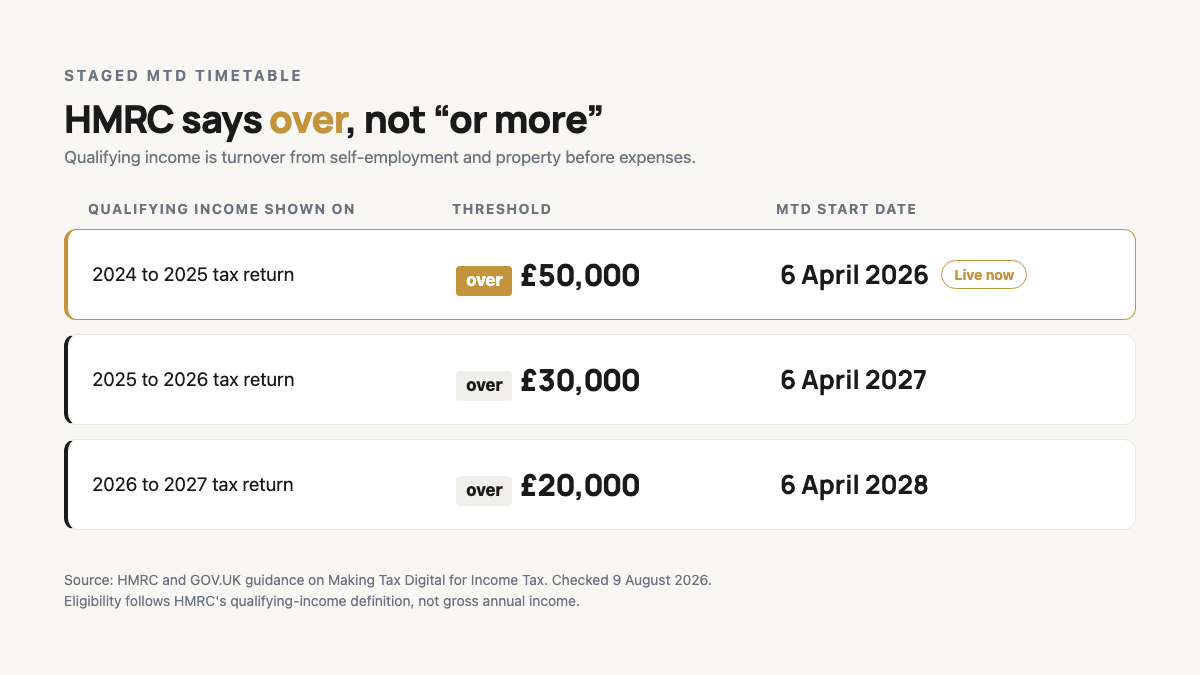
HMRC says over £50,000, not "£50,000 or more". That one-word difference matters at the boundary. The same official guide sets out the later £30,000 and £20,000 phases. [1] HMRC's July 2026 release repeats the staged thresholds. [5]
The first standard update in 2026 covered 6 April to 5 July and was due on 7 August 2026. [5] That date had passed by this article's source check. Use it to understand the cadence, then check HMRC for your own dates and eligibility.
If the timetable applies, your first task is not uploading a folder of receipt images. It is creating the transaction record.
Job 1 is the structured digital transaction record
HMRC defines a digital record as an income or expense record created and stored in compatible software. For relevant self-employment transactions, the current guidance asks for the amount, the date the income was received or expense incurred, and the category. [2]
Take an illustrative £46.80 rail purchase dated 15 May 2026. The digital record needs the £46.80 amount, the 15 May date and a relevant category selected in the software. This example does not decide that the fare is deductible, and it does not prescribe which category is right for a particular business. It only shows the shape of the record.
A receipt photo or PDF may help create that entry. It is not automatically the same thing as the structured entry. The image can show a fare, a timestamp and a rail operator while the software record holds the fields used in the MTD process. That is the practical shape of Making Tax Digital record keeping: structured fields first, supporting evidence alongside them.
HMRC's digital record-keeping notice says a sole trader below the VAT registration threshold may use less detailed income-or-expense categorisation, subject to exceptions. [9] Check the current rule for your circumstances rather than leaving the record vague.
The amount, date and category give the purchase a digital shape. They do not make the evidence behind the £46.80 entry disposable.
Making Tax Digital receipts: retain the supporting document
The same GOV.UK record guidance that describes the digital fields also says you must continue keeping normal Self Assessment records. It names original records, supporting documents or copies used to prepare the tax return, with bank statements and invoices among its examples. [2] General self-employed record guidance also lists proof such as receipts, bank statements, sales invoices, till rolls and bank slips. [7]
Return to the £46.80 rail purchase. The amount, date and category sit in the structured record. The ticket, invoice, card statement or retained copy sits in the evidence trail. Those items answer different questions. None of them, alone, proves that the purchase qualifies for a particular tax treatment.
The strongest version of the scanning objection is reasonable: if compatible software can scan a receipt, surely scanning every receipt is the digital rule. HMRC's software guidance does list scanning receipts and invoices as one way compatible software may create records. It also lists linking a bank account and manually entering income and expenses. [6] Scanning is a possible capture method. The official pages do not establish a universal requirement to scan every paper receipt.
A July 2026 TaxAssist explainer reaches a similar answer on scanning, but calls the first threshold "£50,000 or more". [11] I would return to HMRC for the live threshold and dates.
Digital records must generally be kept for at least five years after the relevant 31 January submission deadline. [2] Very late returns follow a different calculation. [8] Do not guess a destruction date if your filing history is unusual.
Once the evidence is safe, the next distinction is easier: the quarterly update does not carry that evidence to HMRC.
Job 3 sends cumulative totals, not individual receipts
HMRC describes each quarterly update as a summary of income and expenses. The figures are cumulative from the start of the tax year to the end of the update period. Most importantly for receipt admin, HMRC says it will not receive details of individual digital records, such as a receipt or invoice. [3]
For standard update periods, the current deadlines are:
- 7 August
- 7 November
- 7 February
- 7 May
The update periods build through the year, rather than creating four isolated bundles of that quarter's paperwork. [3] By the second update, for example, the summary runs cumulatively from 6 April to 5 October. It is not a packet of receipt images collected between July and October.
Our £46.80 rail transaction contributes to the relevant cumulative expense-category total. The individual entry and the document supporting it remain in the record trail. They do not become attachments to the update.
Calling the update a mini tax return encourages the wrong check: whether every receipt image was sent. Check instead that the records can produce accurate cumulative totals while supporting documents remain available.
Four updates move current totals through the year. They do not settle adjustments, other income or gains, which is why there is still a final annual step.
Job 4 is still the annual tax return
Current GOV.UK guidance says you still submit one tax return each year. After the tax year ends, you check and adjust the digital records where needed, add or check other income and gains, and submit the return through compatible software by 31 January after the tax year. [4]
Put the dates side by side. Standard quarterly updates are due on 7 August, 7 November, 7 February and 7 May. The annual tax return has its own 31 January deadline. The quarterly totals are reports sent through the year. They do not remove the annual return or turn four summaries into four final tax calculations.
The Association of Taxation Technicians groups the system into digital records, quarterly updates and a digital tax return. [10] Practitioner wording can explain the process, but GOV.UK should control what you do and when: it calls the final submission a tax return due by 31 January.
A receipt workflow can keep source records orderly. It cannot make adjustments, decide tax treatment or file the return unless it is the compatible filing software used for that job. Keeping that boundary visible prevents the four artifacts from quietly changing roles.
Run one purchase through the four-part check
Here is the £46.80 rail purchase as one deliberately simplified scenario.
- Record: On 15 May 2026, enter £46.80, the date and the relevant category in compatible software.
- Retain: Keep the ticket, invoice, statement or copy used to support the record and prepare the return.
- Update: Let the £46.80 feed into the relevant cumulative category total. Do not send the individual receipt as part of the quarterly update.
- Return: Use the year's checked records when completing the annual return, after any required adjustments and additions.
This is an organisation test, not advice on whether the fare is allowable, which category applies or which software to choose.
For a real record review, ask four separate questions:
- Is the transaction data present in the digital record?
- Is the supporting document or copy still retrievable?
- Is the transaction reflected in the correct cumulative total?
- Will the year's checked records be available for the annual return?
A month-end receipt closeout routine can help with the first two questions, but it is an operational habit rather than UK tax guidance. ReceiptNote is a receipt capture, archive and export workflow. Its page on organising receipts for UK Self Assessment describes that support, not MTD filing, deductibility decisions or a compliance guarantee.
That gives you a repeatable review. Three shorter questions close the gaps that most often cause the four jobs to be collapsed back into one.
Three questions to settle before your next review
Must every receipt be scanned?
HMRC requires relevant structured digital records and says you must keep original records, supporting documents or copies used to prepare the return. Scanning is one way compatible software may create a record, not a universal scan mandate in the guidance reviewed for this article. [2] [6]
Does HMRC receive my receipts in a quarterly update?
No. Current guidance says HMRC will not receive individual digital records such as a receipt or invoice in the quarterly update. The update carries cumulative income and expense category totals. [3]
Do quarterly updates replace the annual return?
No. One annual tax return remains, completed through compatible software and due by 31 January after the tax year. [1] [4]
HMRC and GOV.UK guidance controls. Thresholds, dates, exemptions and record rules can change, and individual categorisation or tax treatment may need an adviser. The official pages cited below were checked on 9 August 2026.
The phrase “Making Tax Digital receipts” describes a chain, not a single object: a receipt is evidence in it, not the name of the whole chain. Bookmark this four-part MTD obligation map before your next record review.
References
- HM Revenue & Customs: Use Making Tax Digital for Income Tax, Before you use this guide https://www.gov.uk/guidance/use-making-tax-digital-for-income-tax/before-you-use-this-guide
- HM Revenue & Customs: Use Making Tax Digital for Income Tax, Create digital records https://www.gov.uk/guidance/use-making-tax-digital-for-income-tax/create-digital-records
- HM Revenue & Customs: Use Making Tax Digital for Income Tax, Send quarterly updates https://www.gov.uk/guidance/use-making-tax-digital-for-income-tax/send-quarterly-updates
- HM Revenue & Customs: Use Making Tax Digital for Income Tax, Submit your tax return https://www.gov.uk/guidance/use-making-tax-digital-for-income-tax/submit-your-tax-return
- HM Revenue & Customs: Deadline approaches for first Making Tax Digital quarterly update, 23 July 2026 https://www.gov.uk/government/news/deadline-approaches-for-first-making-tax-digital-quarterly-update
- HM Revenue & Customs: Choose the right software for Making Tax Digital for Income Tax https://www.gov.uk/guidance/choose-the-right-software-for-making-tax-digital-for-income-tax
- GOV.UK: Business records if you're self-employed, What records to keep https://www.gov.uk/self-employed-records/what-records-to-keep
- GOV.UK: Business records if you're self-employed, How long to keep your records https://www.gov.uk/self-employed-records/how-long-to-keep-your-records
- HM Revenue & Customs: Making Tax Digital for Income Tax digital record-keeping notice https://www.gov.uk/government/publications/digital-record-keeping-notice-for-making-tax-digital-for-income-tax/making-tax-digital-for-income-tax-digital-record-keeping-notice
- Association of Taxation Technicians: Making Tax Digital for Income Tax, an agents' guide on how to get ready https://www.att.org.uk/making-tax-digital-income-tax-agents-guide-how-get-ready
- TaxAssist Accountants: Do I need to scan my receipts under Making Tax Digital? https://www.taxassist.co.uk/resources/questions-and-answers/do-i-need-to-scan-my-receipts-under-making-tax-digital